
Blog
Best workout app for Apple Watch: choose by what you need to log
Published September 9, 2026 · updated September 27, 2026 · 3 min read
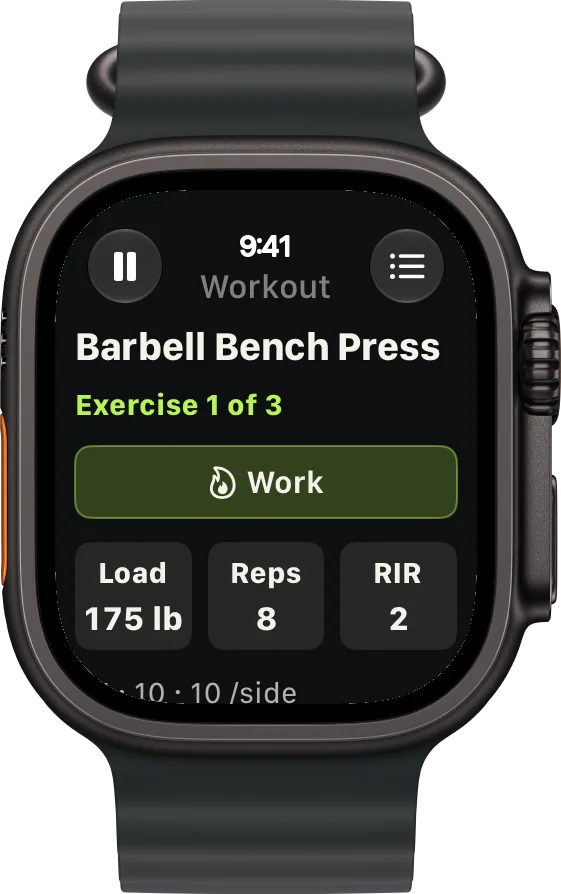
The best workout app for Apple Watch depends on what you need to record. The built-in Workout app covers a broad activity log. A runner may need pace and route details. A lifter needs sets, reps, weight, and rest time on the wrist. Choose the app around the decision you need to make during the workout, then check that its history helps you plan the next one.
For lifting: log each set from your wrist
A strength session is more than its duration and heart rate. If you want to repeat or progress a lift, you need to know the exercise, load, reps, and how hard the set felt. A useful watch app should bring those details to the next set without sending you back to your phone.
RIRLift is built for this workflow. Plan a routine on iPhone, start it on Apple Watch, and log each set with its weight, reps, and RIR (reps in reserve). Previous values appear as a starting point; change them when the session goes differently. The rest timer keeps the next set in view. After training, Coach uses the work you logged to suggest a load for the next session.
If you train away from your phone, test the whole session from the watch: start, log, change a set, finish, then check the saved workout on iPhone. RIRLift keeps active workout logging on the watch, including when the phone connection drops. Its guide to logging on your wrist shows where that workflow helps most.
For running or cycling: prioritize pace and route
A run or ride calls for different information. Check whether the app shows current and average pace, distance, intervals, heart rate, and route data where you need them. Start a real session on the watch and see whether you can pause, resume, and review it without reaching for your phone.
If those are the only details you need, try Apple's built-in Workout app first. It is already on the watch and records common activity types. A specialist running or cycling app becomes useful when you need its particular training plan, navigation, or post-workout analysis. A lifting log adds little to that decision.
For general activity: start with the built-in apps
Apple Workout records a session. Apple Fitness brings your activity history and rings together. If your goal is to keep a record of walks, workouts, and daily movement, this may be enough. Add another app when there is a specific detail you cannot capture or use there.
For lifting, that gap is usually set-level history: the weight and reps you did, the effort you reported, and the target for next time. A workout recorded as “traditional strength training” gives you an activity record, but it does not replace a set log.
Test the watch flow before you commit
Run one complete workout with the app you are considering. Can you see the next action at a glance? Can you correct a set or pause a run without fighting small controls? Does the saved history answer what to do next time? Those checks matter more than a long feature list.
If your main training is lifting, try RIRLift with one of your actual sessions. If you mainly want a record of general activity, start with the apps already on your watch.